Receiving international payments just got easier. With Cleva’s GBP and EUR accounts, eligible users can now receive payments in British Pounds (GBP) and Euros (EUR) using dedicated account details. Whether you work with clients in the UK, serve customers across Europe, or regularly receive money from abroad, you can now receive supported GBP and EUR payments directly through Cleva.
The best part? You don’t need to manually convert the money after receiving it. When you receive GBP or EUR, Cleva automatically converts the funds into USD and credits the resulting amount to your USD balance. You can also view the original currency, conversion details, and transaction information in your account history.
Here’s everything you need to know about Cleva’s GBP and EUR accounts, how they work, and what happens after you receive a payment.
What are Cleva’s GBP and EUR Accounts?
Cleva’s GBP and EUR accounts give eligible users dedicated account details for receiving payments in British Pounds and Euros.
For example, if a client needs to pay you £500, you can provide your GBP account details so they can send the payment in GBP. Similarly, if a client or customer needs to pay you €500, you can provide your EUR account details to receive the payment in EUR.
There is one important distinction however. These are receiving currencies, not separate Cleva wallet balances. This means that your Cleva balance remains in USD after the conversion.
How the GBP Account works
A GBP account allows eligible Cleva users to receive payments in British Pounds.
Once your GBP account has been successfully provisioned, you can access your account details in Cleva and share them with someone who needs to send you GBP.
For example, a UK-based client could send your freelance payment using your GBP account details. Once Cleva receives the payment, the GBP amount is automatically converted to USD, and the resulting USD value is added to your Cleva balance.
Currently, the GBP account is not provisioned in your personal name. The default account name displayed for GBP accounts is Bridge Building.
Therefore, when you share your GBP account details with a sender, they may see Bridge Building as the account or beneficiary name instead of your personal name.
This is part of the current account configuration and does not necessarily mean that the account details belong to the wrong person. If you are receiving a GBP payment, always share the exact account details displayed in your Cleva app and make sure the sender enters them correctly.
How the EUR Account works
A EUR account allows eligible Cleva users to receive payments in Euros.
Once your EUR account has been provisioned, you can access the relevant account details and share them with anyone sending you EUR.
For example, if you work with a client in Germany, France, Spain, or another market that pays in Euros, you can provide your EUR account details so they can send the payment in EUR.
Once the payment arrives, Cleva automatically converts the EUR amount into USD and credits the converted amount to your USD balance.
This means you can receive the payment in the currency your sender uses without needing to manually exchange it yourself.
How to request and receive GBP or EUR payments
Getting started with any of these accounts follows a simple process.
- Open the relevant currency account option in Cleva.
- Request your GBP or EUR account.
- Cleva processes your request.
- Once your account has been successfully provisioned, your account details become available.
- Share the relevant account details with the person sending you money.
Account provisioning may not always happen instantly. Once your account is ready, however, you can access the details and use them to receive supported payments.
Once your account is ready, share the correct account details with the person sending you money. Before the payment is sent, make sure you and the sender confirm that the correct currency account is being used, the account details are accurate, and the sender is using the appropriate payment method.
What happens when you receive GBP or EUR?
One of the most important things to understand about these accounts is what happens after your payment arrives.. GBP and EUR are not maintained as separate balances in Cleva. Instead, the funds are automatically converted to USD.
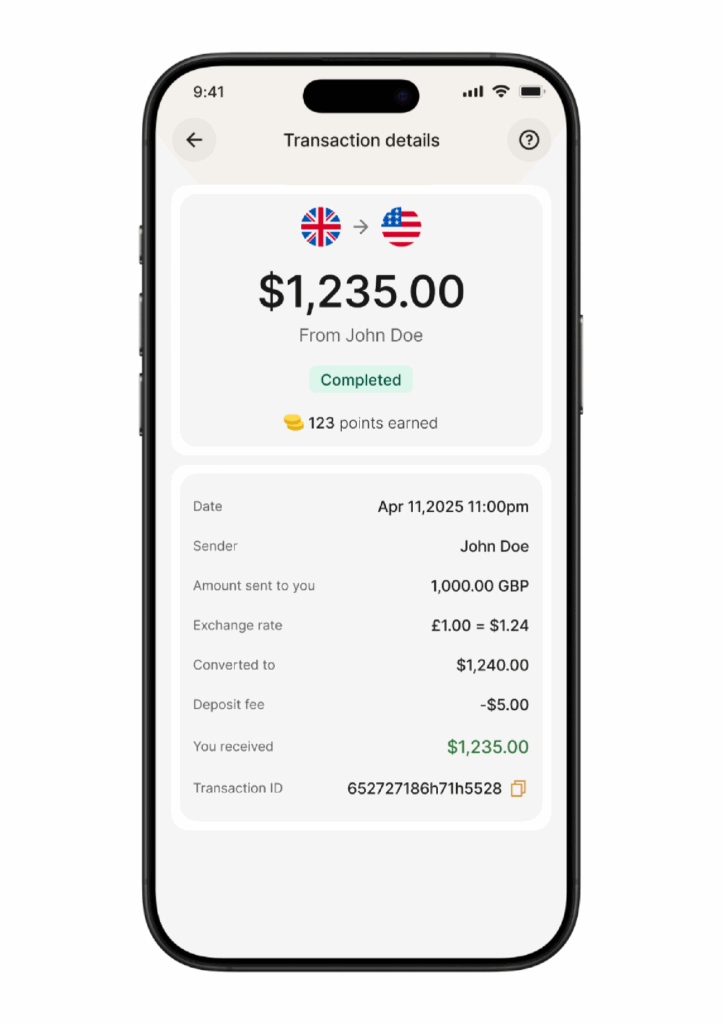
For example, imagine you receive £1,000 GBP.
The payment is automatically converted to USD and credited to your USD balance, with Cleva Points calculated based on the resulting USD value.
Here’s a picture below showing an example of how the transaction and conversion details will appear in your Cleva account.
The same process applies when you receive EUR.
This gives you visibility into both the original payment and the amount ultimately credited to your USD balance.
More Ways to receive international payments
For freelancers, remote workers, creators, business owners, and anyone who receives money from abroad, having the right receiving details can make international payments easier to manage.
With Cleva’s GBP and EUR accounts, eligible users can receive supported payments, see the original transaction currency, and have the funds automatically converted into USD.
You also don’t have to wonder what happened to the original payment. Cleva keeps the transaction context visible, showing the original amount, conversion details, resulting USD amount, and applicable Points.
However, remember that GBP and EUR do not become separate wallet balances. After conversion, your funds remain in your USD balance.
What are the fees for receiving these payments with Cleva?
Cleva charges a 0.8% fee on any of GBP or EUR deposits to Nigeria, with a minimum fee of $2 and a maximum fee of $10.
This means the applicable fee is calculated at 0.8% of the deposit value, but you will never pay less than $2 or more than $10.
Frequently Asked Questions About GBP and EUR Accounts
1. Can I receive GBP with Cleva?
Yes. Eligible Cleva users can request a GBP account and receive supported GBP payments using their dedicated GBP account details.
2. Can I receive EUR with Cleva?
Yes. Eligible Cleva users can request a EUR account and use their dedicated EUR account details to receive supported EUR payments.
3. Do GBP and EUR stay as separate balances in Cleva?
No. These are receiving currencies rather than separate wallet balances. When you receive GBP or EUR, Cleva automatically converts the funds into USD, and the resulting amount is credited to your USD balance.
4. Can I earn Cleva Points when I receive GBP or EUR deposits?
Yes, you can earn Points when you receive any of these deposits. Once the payment is converted into USD, the transaction follows Cleva’s existing Points calculation rules. Points are calculated based on the resulting USD value, subject to the applicable rules.
5. What are the fees for receiving GBP and EUR payments with Cleva?
Cleva charges a 0.8% fee for GBP and EUR deposits to Nigeria, with a minimum fee of $2 and a maximum fee of $10. The applicable fee is calculated based on the deposit value, subject to the minimum and maximum limits. You can find out more on our pricing page.
6. Will my EUR or GBP account show my personal name?
- Your EUR account is set up in your own name.
- However, GBP accounts are currently not provisioned in your personal name. The default account name for GBP accounts is “Bridge Building”, so a sender may see “Bridge Building” when you share your GBP account details. This is totally fine and the GBP payment will still arrive in your own dedicated account when they use your specific account number.
7. Can I see my original GBP or EUR payment after it is converted?
Yes. Your transaction details retain the context of the original payment. You can see the original GBP or EUR amount, the applicable exchange rate, the converted USD amount, and other relevant transaction information. GBP and EUR activity can also be viewed through the relevant currency statements.
8. Do I need to manually convert GBP or EUR to USD?
No. GBP and EUR payments are automatically converted to USD after they are received. The resulting USD amount is then credited to your Cleva USD balance.
9. Can I use my GBP or EUR account to receive third-party payments?
- Yes, if the payment comes through a supported platform e.g Wise, Paypal, Revolut etc.
- You can also receive these type of payments from family with the same last name.
- However, you cannot receive GBP or EUR from a third-party individual’s bank account.
10. Can business accounts receive GBP/EUR deposits into their accounts?
Yes, Cleva Business Accounts can receive GBP and EUR deposits too.
11. How long does it take to receive GBP or EUR deposits?
GBP and EUR deposits are available 24/7, every day of the year, including weekends and holidays. FPS and SEPA Instant payments typically arrive in your Cleva account within 5 minutes after the payment is sent.
Conclusion
Whether you receive payments from UK clients, European customers, international partners, or other senders, these accounts give eligible users more options for receiving international payments.
Request your relevant account details in the Cleva app, share the correct details with your sender, and let Cleva handle the conversion to USD.
Your payment arrives in GBP or EUR. Your balance stays in USD. And you can keep track of the entire transaction from your Cleva account. Request your GBP or EUR account on Cleva today and receive international payments with ease.
Share this article