Introduction
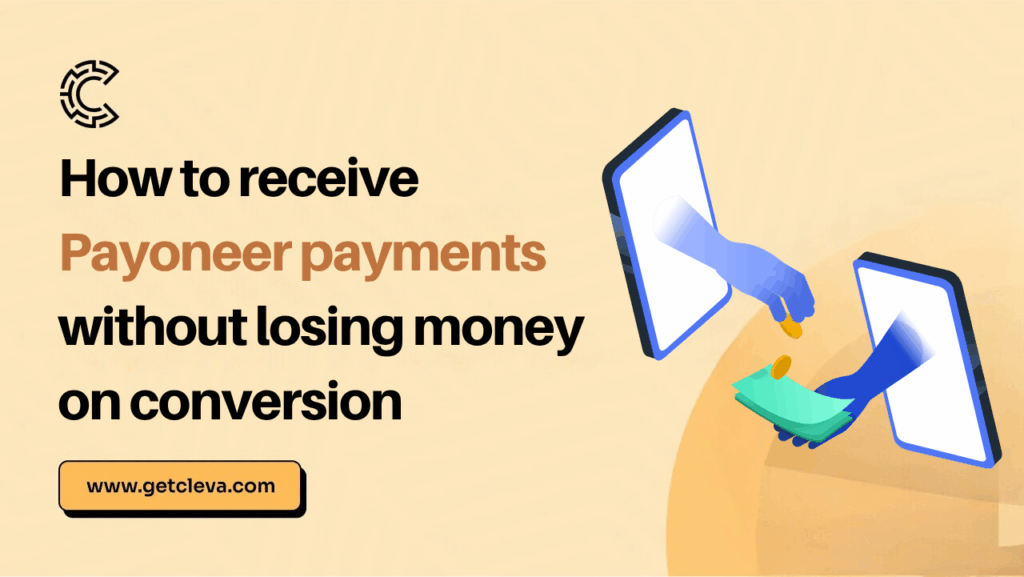
Freelancers across Nigeria earn dollars every day from platforms like Fiverr, Upwork, Toptal, and direct international clients. For many of them, Payoneer is how those payments arrive.
The usual next step is withdrawing to a Nigerian bank account and when that happens, dollars are converted to Naira automatically. You don’t choose the timing. You don’t choose the rate. The conversion simply happens.
This creates a real challenge. If you withdraw on a day when the Naira is stronger, you lose value you could have held. If you need to pay for a tool, subscription, or international service, you’d be converting back into dollars again, paying fees in both directions.
There is a better way.
Why converting on Payoneer costs you more
When you convert dollars to Naira directly on Payoneer, you’re using Payoneer’s exchange rate which typically includes a built-in margin on top of the mid-market rate. That difference quietly eats into your earnings every time you withdraw.
Moving your funds to Cleva first changes the equation. Cleva offers more competitive conversion rates, which means more Naira in your pocket for the same dollar amount.
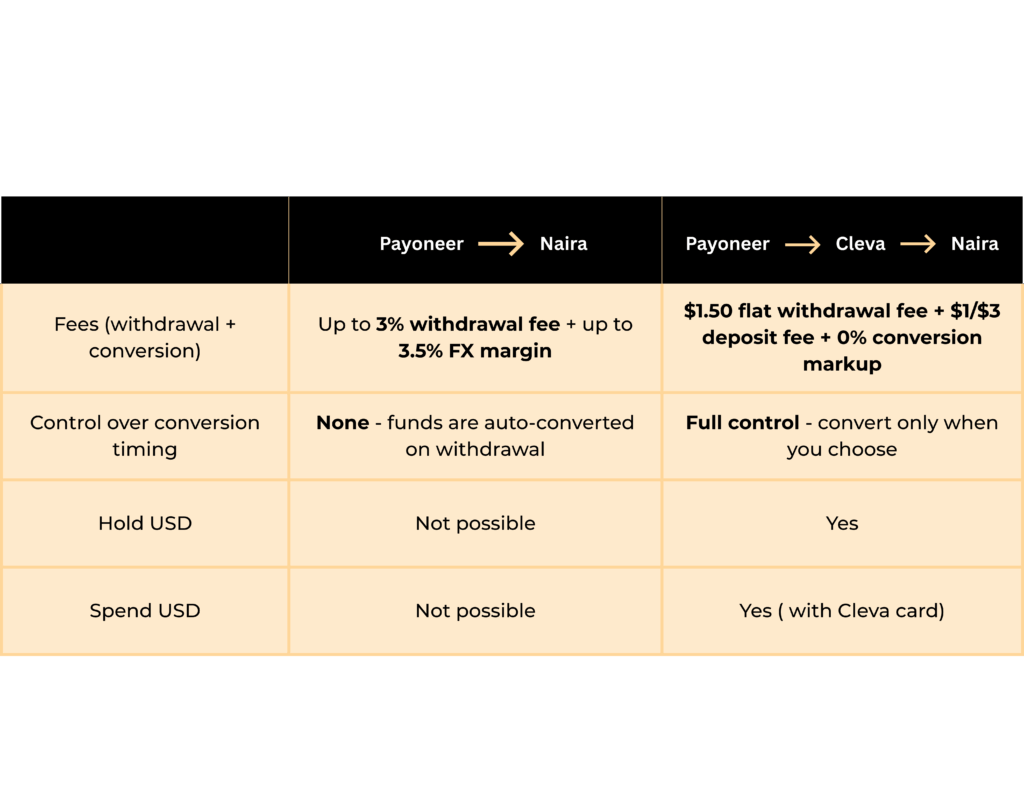
Over time, even a small difference in conversion rates adds up significantly, especially for freelancers earning consistently in USD.
Cleva: Your USD account for dollar earnings
Cleva gives Nigerian freelancers and remote workers a dedicated USD account; one that lets you receive, hold, and spend dollars before deciding whether to convert.
Instead of your Payoneer earnings going straight into Naira, you can withdraw into your Cleva USD account first. Your money stays in dollars until you’re ready to act.
Once your funds are in Cleva, you have full control:
- Convert to Naira instantly at competitive rates, when the timing suits you
- Hold your earnings in USD for as long as you need
- Spend online internationally using your Cleva virtual USD card
- Send USD to other Cleva users
How to receive money from Payoneer to Cleva
Setting up Payoneer withdrawals to your Cleva USD account is straightforward. Here’s how to do it:
- Get your Cleva USD account details. Open the Cleva app and navigate to your USD account. Copy your account number and routing number. These are the details Payoneer will use to send your funds.
- Log in to your Payoneer account. Head to payoneer.com or open the Payoneer app and sign in.
- Go to Withdraw > To Bank Account. From your Payoneer dashboard, select ‘Withdraw’ and then choose ‘To Bank Account.’
- Add Cleva as a bank account. Select ‘Add a bank account,’ choose the United States as the country, and enter your Cleva USD account number and routing number. Set the currency to USD.
- Enter the withdrawal amount and confirm. Type in the amount you want to withdraw, review the details, and confirm the transfer. Payoneer typically processes withdrawals within 1–3 business days.
Who is this useful for?
This setup works well for anyone who receives international payments regularly and wants more control over their dollars:
- Freelancers on Fiverr, Upwork, Toptal, or 99designs
- Remote workers paid in USD by international employers
- Digital creators with global audiences and brand deals
- Consultants and agencies billing international clients
And if you don’t use Payoneer at all, Cleva also supports receiving USD directly through ACH or Wire transfers, so you can share your Cleva account details with clients who pay directly.
One of the most practical advantages of holding USD in Cleva is that you can be intentional about when you convert. When you need Naira urgently, for rent, salaries, or personal expenses, you can convert instantly in the app. But when you don’t need Naira right away, there’s no pressure to convert at all.
This is especially useful during periods when the Naira is weakening against the dollar. Holding your earnings in USD lets you preserve the value of your income until a better moment.
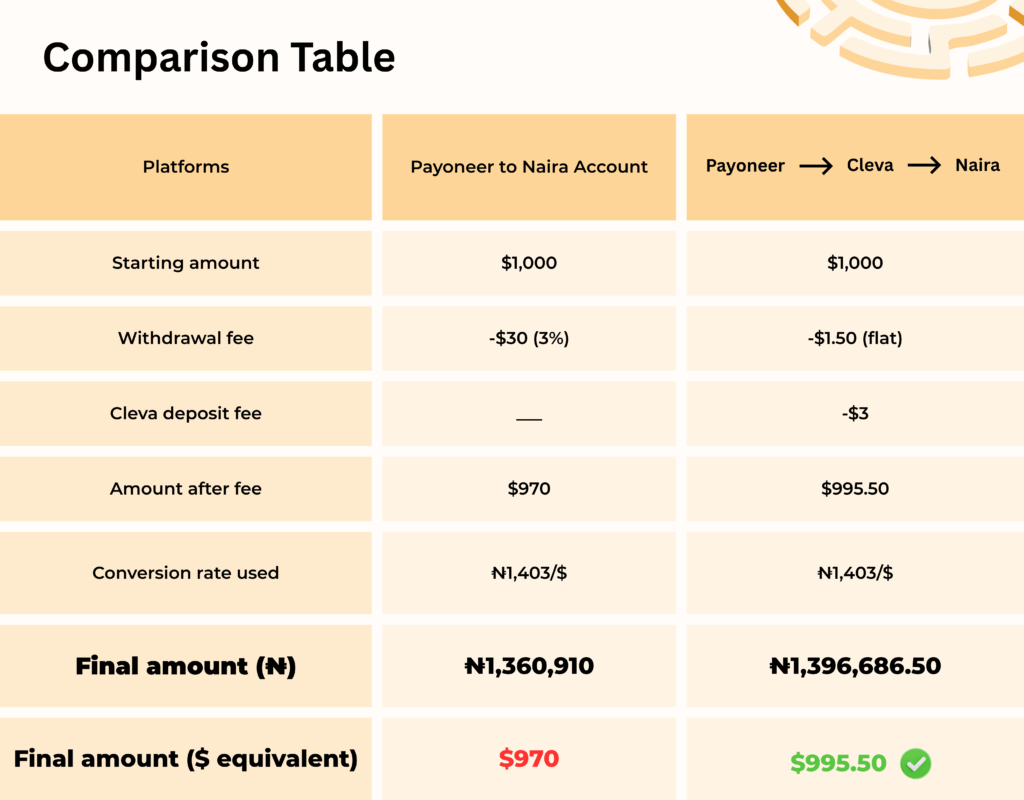
What does a $1,000 Payoneer withdrawal actually cost you?
Let’s compare two scenarios:
- Payoneer → Nigerian Naira account (direct)
- Payoneer → Cleva (USD) → Convert to Naira
(Using a consistent rate of ₦1,403/$ for both)
What this means
Even with the same exchange rate, routing through Cleva still gives you:
- ₦35,776.50 more on a $1,000 withdrawal
- Lower total fees
- More control over how your money is handled
The difference here is purely fee efficiency, not exchange rate advantage.
Frequently Asked Questions
1. Can I withdraw from Payoneer to Cleva?
Yes. If you receive payments through Payoneer, you can add your Cleva USD account details as a withdrawal destination and transfer funds directly.
2. Why withdraw to Cleva instead of directly to my Nigerian bank account?
Withdrawing directly to a Naira account means your dollars are converted immediately at Payoneer’s rate, which is typically less favourable. Moving into Cleva first gives you a better conversion rate and lets you choose when to convert.
3. What can I do once the money is in my Cleva account?
You can convert to Naira instantly at a competitive rate, hold your earnings in USD, spend online using your Cleva virtual card, or send USD to other Cleva users.
4. How long does a Payoneer withdrawal to Cleva take?
Payoneer typically processes bank withdrawals within 1–3 business days. Once funds arrive in your Cleva account, they are available immediately.
5. Do I need Payoneer to receive international payments with Cleva?
No. Cleva supports receiving USD through ACH and Wire transfers, so clients can pay you directly into your Cleva USD account without going through Payoneer.
6. Is there a fee to withdraw from Payoneer to Cleva?
Payoneer charges its standard withdrawal fee for bank transfers. Check your Payoneer account for the applicable rate. Cleva does not charge a fee to receive incoming transfers.
Conclusion
Every time you withdraw Payoneer earnings directly to a Naira account, you’re making two decisions at once: when to convert, and at what rate. The problem is, you’re not actually making those decisions, Payoneer is making them for you.
Cleva puts that control back in your hands. By routing your Payoneer withdrawals into a Cleva USD account, you hold onto your dollars until you’re ready, and when you do convert, you’re getting a better rate than Payoneer would have given you automatically.
It’s a small change in how you handle your withdrawals. But over months of consistent earnings, it’s the kind of change that compounds into real money saved.
Open your Cleva account today and enjoy lower fees and cheaper rates.
Share this article