How does the multi chain wallet work?
How to receive USDC using the multi-chain wallet On Cleva
Have you ever sent USDC on Base to an address meant for another network and realized too late?
That sinking feeling is common with stablecoins. Different networks often mean different wallet addresses. One small mix-up and the money may not arrive where you expected. So people double-check. Then check again. Then ask the sender which network they are using before sharing an address.
Receiving USDC should not be that stressful.
That is why Cleva introduced the Multi-Chain Wallet.
The Multi-Chain Wallet gives you one wallet address that works across multiple supported USDC networks. Instead of keeping track of several wallet addresses depending on where a payment is coming from, you share one address and receive across supported networks.
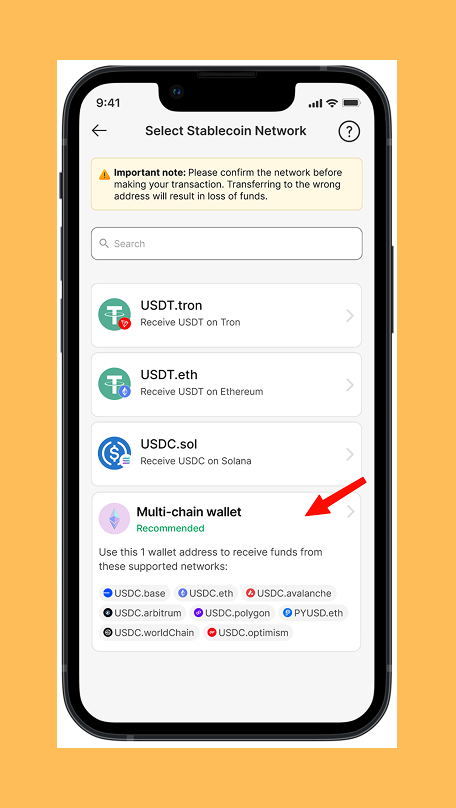
Inside the Multi-Chain Wallet, USDC is now supported on Base, Ethereum, Arbitrum, Polygon, Avalanche, Optimism, WorldChain Networks.
That means more ways to receive USDC and less worry about mixing up wallet addresses.
This does not replace your existing wallets on Cleva. It is an added option to receive USDC on the new supported network with just one wallet address.
How does it work?
The Multi-Chain wallet uses one wallet address across supported networks.
Here is what that means:
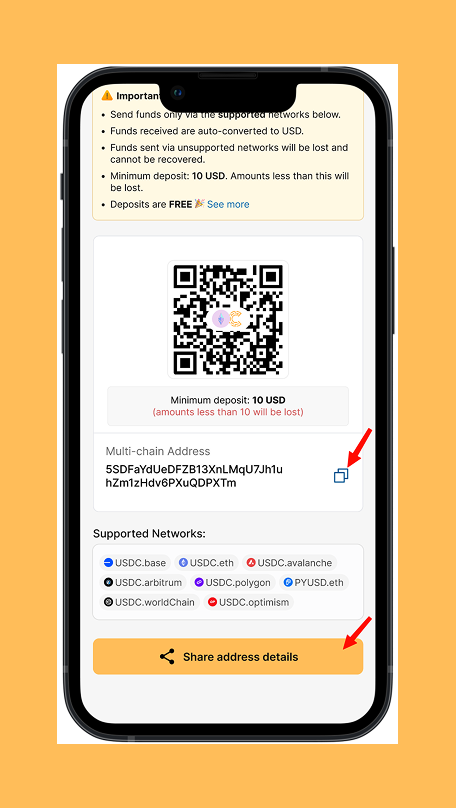
• Your wallet address stays the same, payments must be sent through a supported USDC network and unsupported networks or tokens will not go through.
As long as the sender uses a supported network, you can use the same wallet address to receive your USDC through the Cleva Multi-Chain Wallet.
How to receive USDC using the multi-chain wallet On Cleva
Here’s a quick walkthrough to help you use the Multi-Chain Wallet correctly.
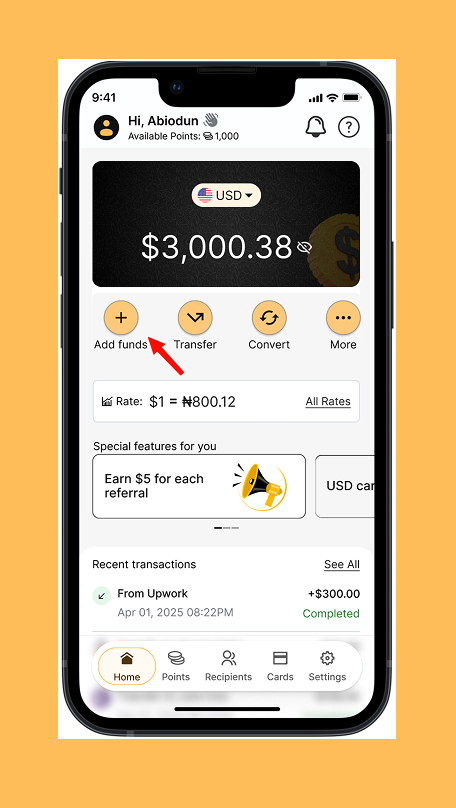
1. Go to your Cleva app homepage and tap “Add funds”
2. Select “Stablecoins”
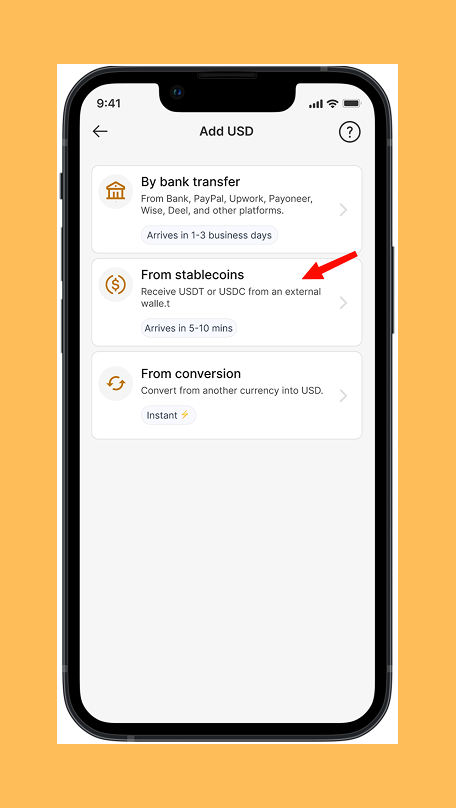
3. Select “Multi-chain Wallet”
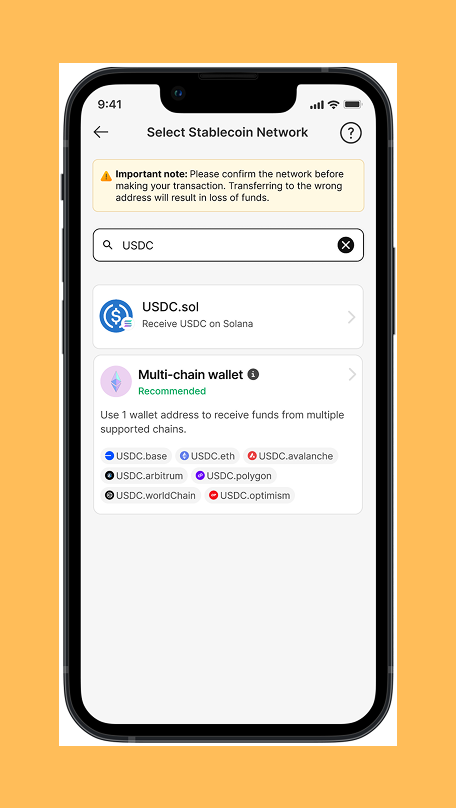
4. You can also search the network
5. Copy and share the wallet address
What is not changing
- USDT continues to work exactly as before
- USDT is still received on Tron and Ethereum only
- Unsupported networks or tokens are still not accepted
- All existing wallets address on Cleva remain unchanged
The Multi-Chain Wallet is an added option, not a new flow.
Frequently Asked Questions
- What is the Multi-Chain Wallet?
An added wallet option that lets one address work across multiple supported networks for stablecoin transfers. - Do I need to turn anything on to use it?
No. It’s available as an option alongside your existing wallets. - Does this replace my existing wallets?
No. All existing wallets remain unchanged. - Do networks still matter?
Yes. Funds must be sent using supported tokens and supported networks. - Can I receive USDT with this wallet option?
No. USDT continues to be received on Tron and Ethereum using existing wallets. - Which stablecoins are supported?
Supported USDC stablecoins on Cleva. - What happens if someone uses an unsupported network?
Funds sent via unsupported combinations may not be recoverable.
Conclusion
Ready to simplify your USDC deposits?
Download the Cleva app, navigate to Add Funds > Stablecoins > Multi-Chain Wallet, and start using one address for all your supported USDC networks.
Share this article